Mastering Banners Flourishes Vectors for Timeless Design Projects
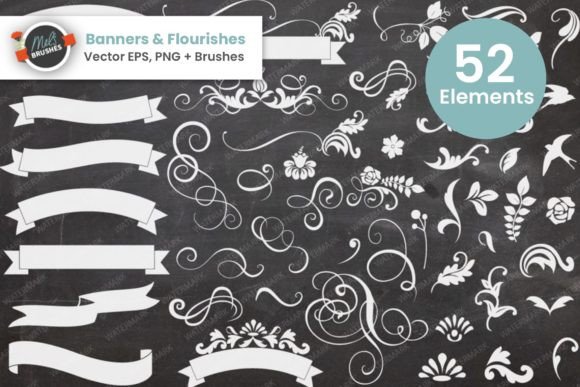
There is a distinct elegance to traditional design that modern, flat aesthetics often struggle to replicate. When you are working on wedding invitations, formal stationery, or branding for a boutique business, the difference between a good layout and a great one often lies in the details. This is where Banners Flourishes Vectors become an indispensable tool. This collection offers a large and versatile set of 53 design elements specifically curated to be mixed and matched, creating endless decorative possibilities. However, simply downloading high-quality assets does not guarantee a professional result. Many creators, from beginners to seasoned freelancers, fall into common traps when integrating these ornate elements into their workflows. Understanding how to properly utilize these banners, swirls, and outlined JPEGs can save you hours of frustration and ensure your final output looks polished rather than cluttered.
The Trap of Over-Decoration and Lack of Hierarchy
One of the most frequent mistakes designers make when they first access a rich library like Banners Flourishes Vectors is the temptation to use everything at once. Because the set includes 53 different elements, there is a psychological urge to justify the purchase or download by incorporating as many swirls and banners as possible into a single project. This approach almost always leads to visual noise. When every corner of an invitation is filled with intricate flourishes, the eye does not know where to rest, and crucial information like dates, names, or calls to action gets lost.
To avoid this, treat these vectors as supporting actors, not the lead. A better approach is to select one primary banner for the header and perhaps a subtle swirl to frame the footer. Leave ample white space. The beauty of these classic designs lies in their ability to frame content, not overwhelm it. Before you finalize your layout, step back and ask if removing an element would make the design clearer. Often, less is significantly more when dealing with high-detail vector art.
Misunderstanding File Formats and Resolution Needs
The package you receive is robust, including high-resolution Photoshop brushes made in CS5, individual transparent PNGs in both black and white, high-quality JPEGs, and Vector EPS files. A critical error occurs when users select the wrong file format for their specific end goal, leading to pixelation or editing limitations.
For instance, if you are designing a massive trade show banner or a vehicle wrap, using the rasterized JPEGs or even the PNGs might result in jagged edges when scaled up. In these scenarios, you must rely on the Vector EPS files. Vectors are mathematically defined shapes that can be scaled infinitely without losing quality. Conversely, if you are working quickly in Photoshop for a social media graphic, importing the heavy EPS files might slow down your workflow unnecessarily. In that case, the transparent PNGs are the efficient choice. Always match the file format to your output medium: vectors for print scaling, rasters (PNG/JPG) for web and fixed-size digital use.
Overlooking the Power of Monochrome and Texture
Another overlooked detail involves the color versatility of the set. The images are provided in both black and white versions, which some users mistakenly view as a limitation. In reality, this is a strategic advantage. A common pitfall is trying to recolor complex vector swirls directly within a design program, which can sometimes result in muddy edges or loss of detail depending on the software used.
Instead, embrace the monochrome foundation. The black and white sets are perfect for creating the on-trend chalkboard effect mentioned in the product description. By placing the white version of a flourish over a dark, textured background and adding a slight noise filter or overlay, you achieve a sophisticated, hand-drawn look that feels organic. If you need color, it is often cleaner to apply a solid color fill to the vector shape in your editing software or use blending modes rather than trying to edit the original source file's internal colors. This method gives you total control over the hue while maintaining the crispness of the original line work.
Neglecting the Outlined JPEGs for Specific Use Cases
The inclusion of outlined JPEGs is a specific feature that often goes underutilized. Some designers ignore these, preferring the transparent PNGs for everything. However, the outlined set serves a unique purpose, particularly when working with non-design clients or specific printing constraints. If you are sending a proof to a client who does not have design software, a flattened JPEG with a visible border can sometimes communicate the intended frame more clearly than a floating transparent element.
Furthermore, certain older printing presses or specific cut-plotter machines may handle solid outlined graphics differently than transparent layers. Ignoring these files limits your toolkit. Before dismissing them, consider if the project requires a hard edge or a specific bounding box that the outlined JPEG provides naturally. It is about having the right tool for the specific constraint you are facing.
Workflow Efficiency and Brush Management
For those utilizing the high-resolution Photoshop brush set, a common inefficiency is poor brush organization. Loading all 53 elements into a single brush preset group can make finding the right swirl tedious during a creative flow. Professionals recommend organizing these brushes into sub-groups based on their function—such as "Corner Flourishes," "Center Banners," and "Dividers."
This small organizational step drastically improves efficiency. When you are in the zone, clicking through hundreds of unorganized presets breaks your concentration. By categorizing them, you maintain momentum. Additionally, remember that these brushes were made in CS5. While they are generally backward and forward compatible, always check your brush dynamics settings. Sometimes, importing older brush sets resets pressure sensitivity or scattering values. A quick check of your brush settings panel ensures that the stroke weight responds correctly to your tablet pressure, preserving the natural, hand-crafted feel of the strokes.
Final Checks Before Commitment
Before you finalize any project using Banners Flourishes Vectors, perform a simple audit. Zoom in to 100% or higher to inspect the edges of your chosen elements. Ensure there is no unwanted pixelation if you are using raster formats. Check the contrast between your flourishes and the background; low contrast can make delicate swirls disappear, especially in printed materials where ink spread might occur. Finally, verify licensing terms if you are using these for commercial client work, ensuring that your usage aligns with the provider's guidelines.
By avoiding the urge to over-decorate, selecting the correct file formats, leveraging the monochrome options for texture effects, and organizing your workflow, you transform these 53 elements from simple clip art into a powerful design system. Whether you are a hobbyist creating wedding invites or a marketer designing a luxury brand campaign, these vectors offer the classic sophistication needed to elevate your work. The key is not just in having the assets, but in applying them with intention and technical awareness.